Everything in One Place
We’ve launched a new My Dashboard for every American CME member — a single home base for your credentials, your courses, and (for those who manage a team) your whole agency. Here’s a quick tour of what’s there and how to use it.
Getting there
Once you’re logged in, click the My Dashboard button in the top menu from anywhere on the site. You’ll also land there automatically right after you log in. If you’re not logged in and try to open it, you’ll see a login prompt — just sign in and you’re on your way.
What every member sees
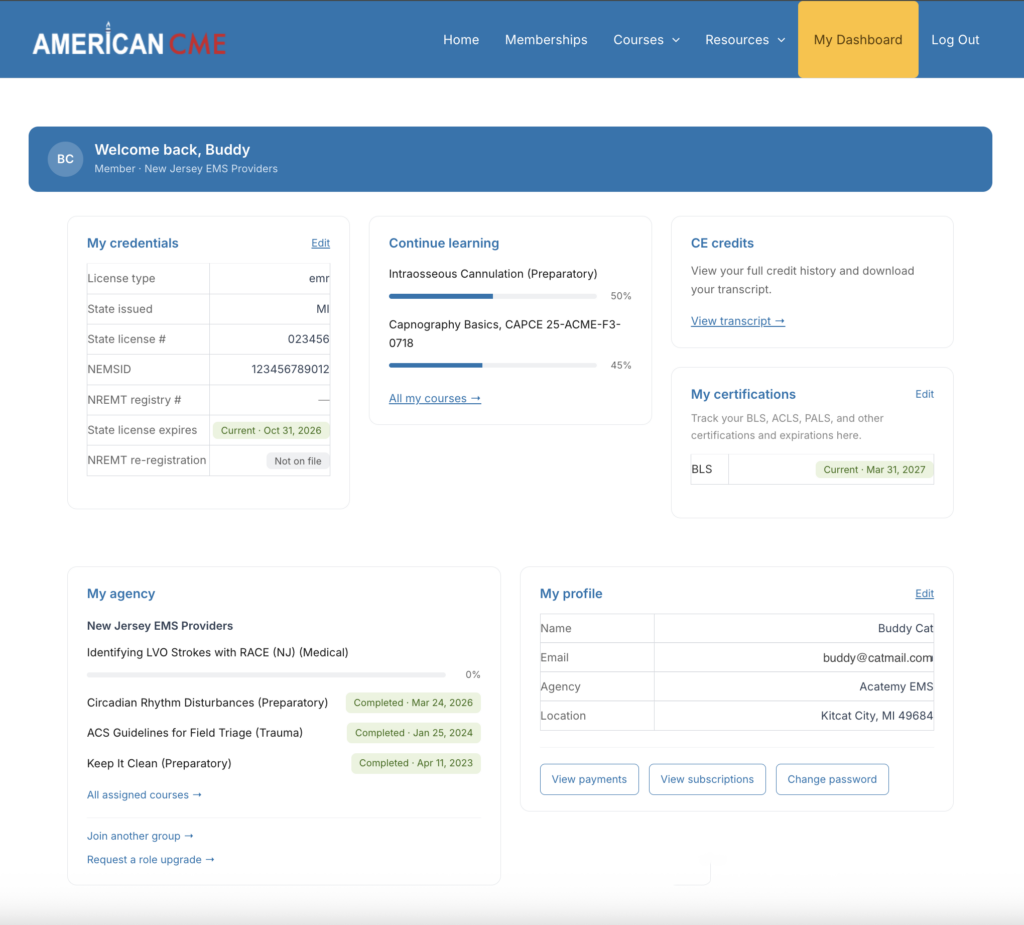
My Credentials. Your license type, state, license number, NEMSID, and NREMT registry number, all in one view. Your license and re-registration dates show a color-coded status — green when you’re current, amber when an expiration is approaching, red when something has lapsed — so you can see at a glance whether anything needs attention. Use the Edit link to update any of it.
Continue Learning. Picks up your in-progress courses with a progress bar for each, so you can jump back in without hunting for where you left off.
CE Credits. A direct link to your full credit history and transcript, ready to view or download whenever you need to report your hours.
My Certifications. A place to track your BLS, ACLS, PALS, and other certifications alongside their expiration dates. Add as many as you like and keep your renewal dates in one spot.
My Profile. Your contact and agency information, plus quick buttons to view payments, manage subscriptions, and change your password.
What Group Leaders see
If you manage an agency account, you’ll also have a My Agency card built for keeping your team on track:
- A roster of every group you lead, with member counts for each.
- License status at a glance — how many members are current, expiring soon, or expired — so compliance gaps are easy to spot.
- Quick actions to add a team member, assign a course, and open detailed reporting to open the interactive Tin Canny dashboard.
For MCAs and very large agencies, the card keeps things fast by showing member counts and pointing you to detailed reporting for the complete course completion breakdown.
That’s it!
The dashboard is live now — log in, click My Dashboard, and take a look. If you run into anything that doesn’t look right, reach out anytime at support@americancme.org.